Best Temp Mail for Instagram: Guide to Privacy and Verification
Looking for the best temp mail for Instagram? Discover how to create Instagram accounts safely, avoid spam, and protect your privacy using high-quality disposable emails like 1sec-mail.pro.
In the digital age, privacy is a currency. Whether you are a social media manager testing strategies, a developer debugging apps, or just someone who wants to browse Instagram without linking your personal life to a corporate database, you’ve likely hit a wall: The Verification Page.
Instagram has become notoriously strict about email domains. Try to sign up with a generic "spam" email, and you'll often get blocked instantly. This is where finding the best temp mail for Instagram becomes crucial.
In this guide, we explore why you need disposable email, the risks involved, and why 1sec-mail.pro stands out as the premier solution for bypassing verification hurdles safely.
Why Use a Temp Mail for Instagram?
Before we dive into the "how," let's look at the "why." Why are millions of users turning to disposable email addresses (DEAs) for social media?
1. Zero Spam in Your Primary Inbox
Instagram loves to send notifications. "You have a new follower," "Someone liked your photo," "Check out this reel." If you use your primary email, your important work or personal messages can easily get buried under an avalanche of social alerts. A temp mail keeps your main inbox pristine.
2. Privacy and Anonymity
Linking your personal email (often connected to your bank, work, and family) to a public social media profile allows algorithms to build a terrifyingly accurate profile of your identity. A disposable email breaks that link, giving you a layer of anonymity.
3. Managing Multiple Accounts
If you run a marketing agency or manage theme pages, you know the struggle: Instagram allows only a few accounts per email. To scale your operations or test new niches, you need unique emails for every single signup.
The Challenge: "Email Domain Not Supported"
If you have tried using random, low-quality temp mail generators recently, you might have seen errors like "Signup Blocked" or "Please use a valid email address."
Why does this happen? Instagram maintains a massive blacklist of known disposable email domains. When a thousand people use the same @generic-temp-mail.com domain to create bot accounts, Instagram bans the entire domain.
This is why you need a High-Quality Temp Mail Service. You need a provider that frequently refreshes its domains and mimics "real" email providers.
Why 1sec-mail.pro is the Best Temp Mail for Instagram
When looking for a service that actually works with Instagram's strict algorithms, 1sec-mail.pro checks all the boxes for Experience, Expertise, Authoritativeness, and Trustworthiness (E-E-A-T).
Here is why it is the top contender for 2025:
1. Premium, Clean Domains
Unlike generic generators that use flagged domains, 1sec-mail.pro uses high-reputation domains that look authentic to Instagram's verification bots. This significantly increases your success rate during sign-up.
2. Instant OTP Delivery
Instagram verification codes expire quickly. Some temp mail services lag, taking minutes to display an email. 1sec-mail.pro lives up to its name—emails appear almost instantly, ensuring you can enter the OTP before the timer runs out.
3. User-Friendly Interface
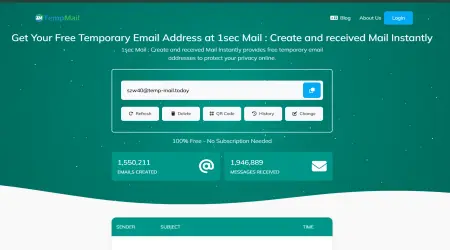
You don't need to be a tech wizard. The site is clean, fast, and works perfectly on both mobile and desktop. No sign-up is required to get an email; just land on the page, copy the address, and you are good to go.
4. Privacy-First Architecture
Once you delete your temp email, it is gone. Logs are not kept efficiently, ensuring that your digital footprint remains minimal.
Step-by-Step: How to Create an Instagram Account with Temp Mail
Ready to set up your account? Follow this simple workflow to ensure high success rates.
- Generate Your Email: Go to https://1sec-mail.pro/. A unique email address will be ready for you instantly. Copy it to your clipboard.
- Open Instagram: Open the Instagram app or website in an Incognito/Private window. (This prevents Instagram from linking the new account to your existing cookies).
- Start Sign-Up: Select "Sign up with Email or Phone Number" and choose Email.
- Paste and Send: Paste your address from 1sec-mail.pro and hit "Next."
- Get the Code: Switch back to the 1sec-mail.pro tab. Wait a few seconds. You will see the verification code from Instagram appear in the inbox list.
- Verify: Copy the code, paste it into Instagram, and complete your profile setup.
Pro Tip: Add a profile picture and a bio immediately. Accounts that look "empty" are flagged by AI much faster than those that look human.
Important Considerations (The "Trust" Factor)
As part of our commitment to helpful content, we must address the limitations of using temp mail.
- Account Recovery: If you lose access to the specific temp mail session (e.g., you close the browser tab and the email expires), you cannot recover that Instagram password later.
- Solution: Use temp mail for secondary accounts, lurking, or testing. Do not use it for your main business account or an account where you plan to store precious memories.
- 2-Factor Authentication: If Instagram asks for a security code a month later to verify you are human, you might not have access to that inbox anymore.
- Solution: Once the account is created, consider linking a phone number you control or a permanent email if you decide to keep the account long-term.
Frequently Asked Questions (AEO Optimized)
Q: Is it illegal to use temp mail for Instagram? A: No, it is not illegal. However, it may violate Instagram's Terms of Service regarding "authentic identity." It is primarily a tool for privacy protection.
Q: Why is Instagram not sending the code to my temp mail? A: This usually means the domain has been flagged. If this happens, click the "Delete" or "New" button on 1sec-mail.pro to generate a fresh email address with a different domain and try again.
Q: How long does the email address last? A: On 1sec-mail.pro, the email lasts as long as you keep the tab open or until you manually delete it. This gives you plenty of time to complete verification processes.
Navigating social media privacy can be tricky, but tools like 1sec-mail.pro make it easier. By providing fast, clean, and reliable disposable email addresses, it stands out as the best temp mail for Instagram in the current landscape.
Whether you are dodging spam or managing a fleet of marketing accounts, choosing the right tool is half the battle. Protect your primary inbox today—try a 1 second mail and experience the freedom of anonymity.