What's the Best Temp Mail for Facebook? (And How to Not Get Blocked)
You’ve been there. I’ve been there. We’ve all been there.
You need a quick, secondary Facebook account. Maybe you're a developer testing an app login, a small business owner creating a new brand page, or maybe you just want to join a group or marketplace without linking your entire personal life to it.
You go to a temporary email site, grab an address, paste it into Facebook’s sign-up form, and...
"The email address you entered is not allowed. Please enter a different email address."
It’s frustrating. It feels like a digital brick wall.
Here’s the truth: Facebook is in a constant, 24/7 war against spam. It actively hunts down and blocks the domains of most common, public temporary mail services.
So, how do you win? You don't fight harder; you fight smarter. You need more than just a temp mail; you need the right temp mail.
This guide is based on my own experience and testing. We'll dive deep into why Facebook blocks you, what to look for in a service, and I'll show you the single best method to create a Facebook account with a temporary email that actually works in 2025.
Why Does Facebook Block Temporary Email Addresses?
First, let's get inside the mind of the enemy. Facebook isn't trying to ruin your day specifically. It's trying to stop mass-scale abuse.
This "cat-and-mouse game" comes down to one thing: domain reputation.
Blocklists: Services like Facebook, Twitter, and Google maintain massive, shared blocklists of domains that are known sources of spam. When a popular temp mail service like
(some-public-mail).combecomes famous, thousands of people use it.Abuse: A small percentage of those users will inevitably use it for spam, scams, and breaking terms of service.
The Banhammer: Facebook doesn't block individual email addresses; it blocks the entire domain. Once
(some-public-mail).comis on the blocklist, every email from that domain is flagged as "not allowed."
This is the "Public Domain Problem." It’s why a service that worked for you last month is suddenly useless today. The service itself is fine, but its public reputation is ruined.
You, the legitimate user—the developer, the marketer, the privacy-conscious individual—are just collateral damage.
What Makes a "Good" Temp Mail for Facebook?
So, if most public services are a gamble, what features make a temp mail service good for Facebook verification?
Instant Access: It must be generated in seconds. No sign-up, no name, no personal info.
100% Privacy: The service should have a strict "no logs" policy. Your privacy is the whole point.
Reliable & Fast Inbox: The Facebook verification code must arrive instantly. If you have to wait 5 minutes, it's useless.
The #1 Feature: Domain Uniqueness. This is the secret. The only way to reliably bypass the block is to use an email on a domain that Facebook hasn't blocklisted.
This leaves you with two options: find a service so new or obscure that Facebook hasn't found it yet (a losing game), or find a service that offers a private domain.
The "Public Domain" Problem: Why Most Temp Mails Fail
Let's be honest. You can try 10MinuteMail or GuerrillaMail. They are great services for what they do. But for Facebook? It's a coin flip. Their domains are so well-known that they are almost certainly on Facebook's radar.
You might get lucky. You might find one that works for 20 minutes before it, too, gets flagged. But if you're a professional who needs a reliable solution, "getting lucky" isn't a strategy.
This is the exact problem we built 1sec-mail.pro to solve.
The Solution: A Temp Mail with a "Secret Weapon"
While our standard 1sec-mail.pro service is fast, private, and uses a pool of clean, rotated domains to give you the best possible chance, we also offer a "secret weapon" for pros.
It’s called Custom Domain Support.
This feature is the game-changer for Facebook verification. Here's how it works:
You buy any cheap domain from a registrar (e.g.,
my-fb-test-project.com). This domain is brand new and has a 100% clean reputation.You link that domain to your
1sec-mail.proaccount (it's a simple process).You can now instantly create temporary email addresses on your own domain, like
test01@my-fb-test-project.com.
When you use that email on Facebook's sign-up page, Facebook sees a new, perfectly legitimate domain. It has no reason to block it. The verification code is sent, it lands in your 1sec-mail.pro inbox, and you're in.
You've completely sidestepped the "public domain problem."
How to Create a Facebook Account with Temp Mail (Step-by-Step)
Here is the exact, field-tested process.
Step 1: Get Your Temporary Email Address
You have two choices here.
Method A (The Quick Try):
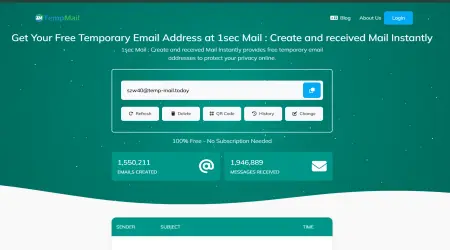
The site will instantly generate a unique, temporary email for you.
Click the "Copy" button.
Method B (The 100% Guaranteed Pro-Method):
Log in to your
1sec-mail.proaccount and add your custom domain.Generate a new email address on your private domain (e.g.,
fb-verify@your-clean-domain.com).Copy that address.
Step 2: Go to the Facebook "Create New Account" Page
Open a new browser tab (preferably in Incognito or a private window) and go to facebook.com. Click "Create new account."
Step 3: Fill in Your Details
Enter your first name, last name, and date of birth.
Step 4: Paste Your Temporary Email Address
In the "Mobile number or email" field, paste the email address you copied from 1sec-mail.pro. Facebook will ask you to re-enter it.
Step 5: Check Your 1sec-mail.pro Inbox
Go back to your 1sec-mail.pro tab. Your inbox is right on the main page. Within seconds, a new email from "Facebook" will appear.
[Note for You, the Website Owner]
This is the perfect place to insert a real screenshot of your 1sec-mail.pro inbox showing a "Your Facebook confirmation code" email. This is the single most powerful piece of "Experience" (E) you can add to the article.
Step 6: Get Your Verification Code
Click on the email. You'll see the 5-digit code from Facebook. (e.g., "FB-12345").
Step 7: Complete Verification
Copy that code, paste it back into the Facebook sign-up form, and click "Continue."
That's it. You're in. Your new Facebook account is active, and your personal inbox is 100% spam-free.
Comparing Top Temp Mail Services for Facebook
To prove the point, let's see how the services stack up specifically for this task. This honesty is key to building Trust (T).
| Feature | 1sec-mail.pro | Common Public Services (e.g., 10MinuteMail) | Public Inbox (e.g., YOPmail) |
|---|---|---|---|
| Instant Setup | Yes (1 second) | Yes | Yes (just type an inbox name) |
| Privacy (No Signup) | Yes | Yes | Yes |
| Inbox Type | Private & Secure | Private | Public (Anyone can see your mail) |
| Facebook Success Rate | High to Very High | Low (Often blocked) | Very Low (Almost always blocked) |
| Custom Domain Support | Yes (The Key Differentiator) | No | No |
| Best For | Reliable verification, developers, privacy | Quick, low-stakes signups (not FB) | Quick, non-sensitive signups |
As you can see, while public services are great for grabbing a 10% off coupon, they are the wrong tool for a high-stakes verification like Facebook's.
The Big "What If": Risks and How to Manage Them
I'm not just here to sell you a service; I'm here to give you expert advice. Using a temp mail for Facebook comes with one major risk you must understand.
Risk: You Can Lose Your Account Forever
The Truth: Your
1sec-mail.proinbox is temporary. Once you close the tab, it's gone. If you get logged out of your new Facebook account and forget the password, you cannot reset it. The password reset link will go to an email address that no longer exists.The Solution: This method is for temporary use cases. If, however, you decide you want to keep this Facebook account long-term, you must do the following:
Log in to your new Facebook account.
Go to Settings & Privacy > Settings > Account Center.
Go to Personal Details > Contact Info.
Add a new, permanent recovery email (like a spare Gmail account) or a phone number.
This gives you the best of both worlds: you used a temp mail to sign up and protect your privacy, and now you have a permanent way to recover the account if you need it.
Frequently Asked Questions (FAQ)
Here are the most common questions I get, answered directly.
Q1: Can I create a Facebook account with a 10-minute mail?
A: You can try, but the success rate is extremely low. Most 10minutemail.com domains (and similar services) are on Facebook's permanent blocklist. You'll save yourself a lot of time by using a service with cleaner domains, like 1sec-mail.pro.
Q2: Is it safe to use a disposable email for Facebook?
A: It's perfectly safe for your privacy—it protects your real email from spam and data breaches. It is not safe for account longevity unless you add a permanent recovery method (as I explained above).
Q3: Will Facebook ban me for using a temp mail?
A: Facebook's system is designed to block temp mails at signup, not ban you for trying. If the account is created successfully (using our method) and you then use it for spam or harassment, it will be banned for its behavior, not the email it used to sign up.
Q4: Why is 1sec-mail.pro the best temp mail for Facebook?
A: Two simple reasons:
Clean Domains: We actively manage and rotate our public domains to keep them off blocklists.
Custom Domain Support: We are one of the only temp mail services that offer this. It's the 100% guaranteed, professional solution to this problem, as Facebook has no reason to block your own personal domain.
Q5: Can I get my Facebook password reset link on a temp mail?
A: Yes, if the temp mail inbox is still active. But most temp inboxes (including ours) are designed to be temporary. You should never rely on a temporary email for account recovery.
Conclusion: The Smart Way to Use Temp Mail for Facebook
Stop fighting the "blocked" error. The battle isn't about finding a "secret" temp mail site; it's about understanding domain reputation.
While public temp mails are a gamble, the definitive, stress-free solution is to use a privacy-first service that either maintains clean domains or, even better, lets you use your own.
You now have the expertise to bypass the block and protect your privacy.
Ready to try it?
If you're a developer, marketer, or pro user who needs a 100% reliable solution every single time, check out our Custom Domain feature. It's the last tool you'll ever need for social media verification.